Apple MacBook Air M1 Review in 2025
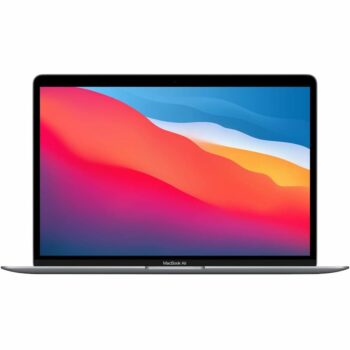
Apple has consistently set the benchmark for premium ultrabooks, and the MacBook Air M1 is no exception. Since its release in late 2020, this laptop has redefined what we expect from a compact, lightweight machine. With Apple’s M1 chip, fanless design, and outstanding battery life, it remains a top contender even in 2025.
This detailed review explores every aspect of the MacBook Air M1, including performance, design, display, battery life, software compatibility, and why it remains a worthy purchase in today’s market. Whether you are a student, professional, or casual user, this review will help you determine if the MacBook Air M1 is the right choice for you.
Design & Build Quality
Elegant, Lightweight, and Durable
The MacBook Air M1 retains the classic wedge-shaped design that has made the Air lineup popular since its inception. At just 2.8 pounds (1.29 kg) and 0.63 inches thin, it is one of the lightest premium laptops available. The 100% recycled aluminum unibody construction feels premium, solid, and built to last.
Apple offers this model in three colors: Gold, Silver, and Space Gray. The overall design remains minimalistic, with a sleek finish and the iconic Apple logo centered on the lid. Thanks to its fanless design, the MacBook Air M1 operates completely silently, making it an excellent choice for students and professionals who value a distraction-free environment.
Comfortable Keyboard & Precise Trackpad
Apple’s Magic Keyboard significantly improves upon the previous butterfly mechanism, offering a reliable and comfortable typing experience. The 1mm key travel provides satisfying feedback, and the backlit keys make it easy to type in low-light conditions.
The Force Touch trackpad is one of the best in the industry, featuring precise tracking, smooth gestures, and haptic feedback. The spacious design ensures easy navigation through macOS, making scrolling, zooming, and multitasking seamless.
A Touch ID sensor is integrated into the power button, allowing for fast and secure authentication. Whether logging in to your device or making secure online purchases, Touch ID enhances both convenience and security.
Display & Visual Experience
The MacBook Air M1 features a stunning 13.3-inch Retina Display with a resolution of 2560 x 1600 pixels. The high pixel density ensures crisp text and vibrant visuals, making everything from reading documents to watching videos a pleasure.
Apple’s True Tone technology automatically adjusts the display’s color temperature based on ambient lighting, reducing eye strain and providing a more natural viewing experience. The display supports the P3 wide color gamut, ensuring vivid and accurate colors, which is particularly beneficial for photographers, video editors, and graphic designers.
With a brightness of 400 nits, the screen remains bright and easy to view in most lighting conditions. The only downside is the 60Hz refresh rate, which is not as smooth as the newer 120Hz ProMotion displays found in more recent MacBooks. However, for everyday use, this is unlikely to be a significant drawback.
The slim bezels surrounding the display contribute to an immersive experience, maximizing screen real estate without increasing the overall size of the laptop. The anti-reflective coating also helps reduce glare, making it more comfortable to work in bright environments.
Performance: Apple M1 Chip
A Revolutionary Processor
Apple’s transition from Intel to its own M1 chip marked a huge leap in performance. The M1 chip is built on a 5nm process and features an 8-core CPU, split into four high-performance cores and four efficiency cores. The chip also includes an 8-core GPU (7-core in the base model), providing excellent graphics performance for creative applications and everyday tasks.
Real-World Performance
- Everyday Tasks: The MacBook Air M1 handles web browsing, streaming, and document editing with ease.
- Creative Workflows: Applications like Final Cut Pro and Adobe Photoshop run smoothly, making this laptop a great option for content creators.
- Coding & Development: Developers using Xcode, Docker, or VS Code will experience fast compile times and responsive performance.
- Gaming: While not designed for gaming, the MacBook Air M1 can run macOS-native games and Apple Arcade titles efficiently.
- Multitasking: Running multiple applications simultaneously, including large spreadsheets and video calls, remains fluid with Apple’s optimized memory management.
Unified Memory & Storage
The MacBook Air M1 comes with either 8GB or 16GB of unified memory. Unlike traditional RAM, Apple’s unified memory architecture allows the CPU, GPU, and Neural Engine to share resources efficiently, resulting in smooth performance across all tasks.
Storage options range from 256GB SSD to 2TB, with SSD speeds reaching up to 3.2GB/s read speeds. This ensures fast boot times and quick file transfers, making multitasking seamless. Expanding storage is not possible after purchase, so choosing the right configuration at checkout is crucial.
Battery Life & Charging
One of the standout features of the MacBook Air M1 is its outstanding battery life. Apple claims up to 18 hours of video playback and 15 hours of web browsing, making it one of the longest-lasting laptops in its category.
Charging is done via USB-C, and the 30W power adapter provided in the box is sufficient for everyday use. For users who need faster charging, a higher-wattage charger can be used. Many professionals opt for USB-C hubs with pass-through charging to expand connectivity while keeping the laptop powered up.
Compared to competing ultrabooks, the MacBook Air M1 outperforms many Windows laptops in efficiency, thanks to the tight integration of Apple’s hardware and software.
macOS & Software Optimization
The MacBook Air M1 ships with macOS Sonoma, offering a fast and secure computing experience. Thanks to the Rosetta 2 emulator, Intel-based applications run smoothly on the M1 chip, while native ARM apps achieve even better performance.
One of the biggest advantages of the M1 chip is its ability to run iOS and iPadOS apps natively. This allows users to access a broader ecosystem of applications, enhancing both productivity and entertainment options.
With macOS optimizations, the M1 chip delivers improved power efficiency, reduced heat generation, and prolonged battery life compared to Intel-based MacBooks.
The macOS ecosystem also integrates seamlessly with other Apple devices, allowing features like Handoff, Universal Clipboard, and AirDrop to enhance workflow efficiency.
Ports & Connectivity
The MacBook Air M1 has a minimalist port selection:
- Two USB-C / Thunderbolt 3 ports (supports charging, data transfer, and external displays up to 6K resolution)
- 3.5mm headphone jack
For users who require additional ports, investing in a USB-C hub or docking station is recommended.
Wireless Connectivity
- Wi-Fi 6 provides faster and more stable internet connections.
- Bluetooth 5.0 ensures seamless connectivity with accessories such as AirPods and wireless mice.
Is the MacBook Air M1 Still Worth Buying in 2025?
Even with the release of newer MacBook Air M2 and M3 models, the MacBook Air M1 remains an excellent option for many users.
It is a great choice for:
- Students who need a lightweight laptop with long battery life.
- Professionals who work with office applications and presentations.
- Content creators who edit photos and videos.
- Developers who need a powerful yet efficient machine for coding.
- Everyday users who want a reliable laptop for web browsing, media consumption, and multitasking.
Final Verdict: Should You Buy It?
The MacBook Air M1 continues to be a compelling choice in 2025 for users looking for a balance of performance, battery life, and affordability. With years of software updates guaranteed, it remains a solid investment.
If cutting-edge features are not a priority, the MacBook Air M1 is still a fantastic choice for anyone looking for a high-quality, long-lasting laptop.